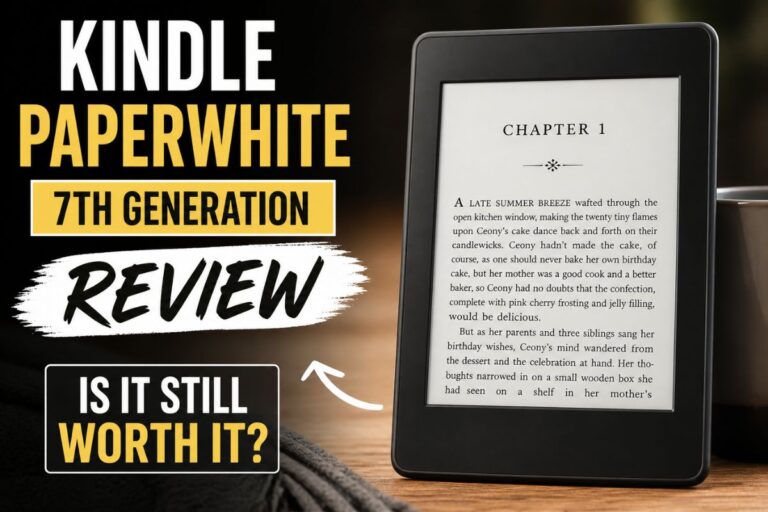
A faster, brighter, ad‑free Kindle that’s perfect for everyday reading.
You want an e-reader that feels like paper, lasts weeks, and won’t blind you at night. You’d love to ditch phone distractions and heavy hardbacks, but you still want speed, storage, and warm light for late reading. In this amazon kindle paperwhite review, I’ll break down what actually matters after months of use—comfort, battery, UI polish, and how it holds up at the pool, on red-eye flights, and under a blanket at 2 a.m. If you’ve been on the fence between a tablet and a true e-reader, this one hits the sweet spot.

Is the Kindle Paperwhite Signature Edition Good?
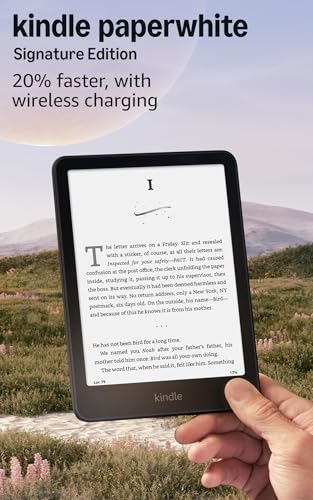
Yes—for most readers, it’s the best Kindle to buy. The Kindle Paperwhite Signature Edition adds smart extras that you feel every day: auto-adjusting front light, 32GB storage, and wireless charging. It keeps the core Paperwhite strengths too: a sharp 300 ppi 6.8″ display, warm light, USB‑C, fast page turns, and an IPX8 water-resistant build. If you read a few books a month or love long trips, you will notice the comfort and battery life.
On a beach week, I charged once, read daily, and never worried. On a red-eye, the warm, auto-dimming light saved my eyes and my neighbor’s sleep. For me, the Kindle Paperwhite Signature Edition nails the “just read” experience without apps yelling for attention.
My First Impression for Kindle Paperwhite Signature Edition
Out of the box, the presentation felt clean and premium. The device itself is slim, with a soft-touch back that grips well. The bezels are even, and the 6.8-inch screen looks big without feeling bulky. Setup was painless: connect Wi‑Fi, sign in, pick a font, and it quietly synced my library. I slid a book open and the 300 ppi text looked crisp, like fresh ink.
The first night sealed it. The warm light dialed itself down, the brightness shifted with my room, and page turns felt snappier than my older Paperwhite. I felt a small, nerdy joy tapping “next” with zero glare and no blue light sting. It met—then topped—my expectations.

What Makes It Stand Out / Key Features
- 6.8-inch glare-free E Ink display with 300 ppi for print-like text
- Auto-adjusting front light plus adjustable warm light for day and night comfort
- 32GB storage for a huge library, comics, and audiobooks
- Qi wireless charging support + USB‑C wired charging
- 20% faster performance for quick page turns and smoother navigation
- IPX8 water resistance for poolside and bath reading
- Weeks-long battery life on a single charge
- Ad-free experience out of the box (Signature Edition)

What I Like
- Auto brightness works great—set it and forget it
- Warm light makes late reading easy on the eyes
- The wireless charging mat keeps it always topped up
- 32GB means I never worry about storage, even with big series
- Fast page turns and smooth UI reduce friction
- Water resistance gives peace of mind at the pool or bath

What Could Be Better
- Price is higher than the standard Paperwhite
- No physical page-turn buttons (some readers prefer them)
- Still best for books; not for PDFs with heavy charts

My Recommendation
If you crave the best reading comfort without going full luxury, the Kindle Paperwhite Signature Edition is the sweet spot. You get auto-brightness, warm light, wireless charging, and big storage that future-proofs your library. It is ideal for daily readers, travelers, and anyone who wants an ad-free Kindle that feels premium but stays practical. If you listen to audiobooks, pair it with Bluetooth headphones and enjoy hands-free sessions. For gifting, it hits that perfect “wow” without overpaying.
| Best for | Why |
|---|---|
| Night readers | Auto-adjusting light and warm tint protect your eyes |
| Travelers and commuters | Weeks-long battery and light body fit any bag |
| Big libraries and series fans | 32GB stores thousands of books and comics |
Alternative Products You Can Consider
Kindle Paperwhite (Standard) — Great if you want the same 6.8-inch 300 ppi screen at a lower price. You lose wireless charging, auto brightness, and some storage, but the core reading experience stays excellent. For budget-conscious buyers who still want warm light and water resistance, this is a strong pick.
Kobo Libra 2 — Best for library lovers and button fans. It has a 7-inch screen, 32GB storage, great ComfortLight Pro, and physical page-turn buttons. It also supports OverDrive library borrowing in many regions. Compared to the Kindle Paperwhite Signature Edition, it trades Kindle’s ecosystem for buttons and broader file support.
Kindle Oasis — The premium Kindle with an aluminum build, 7-inch screen, and page-turn buttons. It feels luxurious in the hand. It’s pricier and older, though. If you want the best ergonomics and do not mind the extra cost, Oasis is still a joy, but the Signature Edition delivers better value.
| Product | Best For | Key Difference |
|---|---|---|
| Kindle Paperwhite Signature Edition | Everyday readers who want premium comfort | Auto brightness, wireless charging, 32GB, ad-free |
| Kindle Paperwhite (Standard) | Budget-focused readers | No wireless charging or auto brightness; smaller storage |
| Kobo Libra 2 | Readers who want buttons and library borrowing | Physical buttons, 7″ screen, OverDrive support |
| Kindle Oasis | Premium feel and ergonomics | Aluminum body, page buttons, higher price |
Final Verdict: Which Should You Buy?
If you want the best balance of comfort, features, and price, go with the Kindle Paperwhite Signature Edition. Auto brightness, warm light, wireless charging, and 32GB make reading simple and cozy, day or night. It fits most readers and most budgets without compromise.
On a tight budget? The standard Paperwhite keeps the great screen and battery while trimming extras. Want page-turn buttons and a premium build? The Kindle Oasis still charms, but costs more. Need library borrowing and buttons? Kobo Libra 2 is a strong rival. For most people, though, the Signature Edition is the e-reader you will pick up, love, and keep.
FAQs Of amazon kindle paperwhite review
Is the Signature Edition worth it over the standard Paperwhite?
If you read daily or value convenience, yes. Auto brightness, wireless charging, extra storage, and ad-free out of the box are perks you’ll use often.
How long does the battery last?
With average use, expect weeks on a single charge. Heavy brightness or lots of Bluetooth audiobooks will shorten that, but it still lasts far longer than a tablet.
Can I read by the pool or in the bath?
Yes. It has IPX8 water resistance. Splashes and brief submersion are fine, but always dry it well after.
Does it support audiobooks?
Yes, via Bluetooth headphones or speakers. Pair once, and it reconnects fast. Note that Audible content works best in the Kindle ecosystem.
Is the screen easy on the eyes at night?
Very. The warm light and auto brightness reduce glare and blue light. Text stays sharp and gentle, even in a dark room.