Use a rubber band, proper drivers, or a small extractor to gently pull the screw free.
I’ve spent years repairing laptops, and I know how frustrating a stripped laptop screw can be. This guide on how to remove a stripped laptop screw walks you through simple, safe, and tested methods. You’ll learn tool choices, step-by-step fixes, prevention tips, and when to call a pro. Read on, and you’ll feel confident tackling that stubborn screw without damaging your laptop.

Why laptop screws strip and what that means
Stripped screws lose their drive recess shape. That makes standard drivers slip and spin. Screws strip from wear, wrong driver size, or over-torquing during repairs. Cheap screws and stripped threads also make removal harder.
Understanding why a screw stripped helps pick the right fix. If you rush, you can damage the laptop case or board. Take it slow and follow safe steps to remove a stripped laptop screw.

Source: ifixit.com
Essential tools to remove a stripped laptop screw
Use the right tools. The right tool cuts work time and risk. Below are tools that help you remove a stripped laptop screw.
- Precision screwdriver set: flat and Phillips sizes. Match the exact head.
- Rubber band or silicone pad: adds grip for slipped drivers.
- Screw extractor kit: small extractors for tiny machine screws.
- Small needle-nose pliers or locking pliers: grab raised screw heads.
- Super glue or soldering iron (as last resorts): bond a bit of metal for a grip.
- Dremel with a cutting wheel or tiny drill bits: for stubborn cases where you need a new slot.
- Magnifier and strong light: see the screw recess and work precisely.
I usually carry a small kit with these items. It saved me from paying for shop work more than once.

Source: beetstech.com
Step-by-step methods to remove a stripped laptop screw
Here are clear methods ranked by risk and invasiveness. Start with the least invasive. Proceed only if the prior method fails. Each method includes quick tips and when to stop.
Method 1 — Use a larger driver or match the correct bit
A worn bit may cause stripping. Try a new, correctly sized driver. Push firmly and keep the bit straight. This solves many problems fast.
Method 2 — Rubber band or silicone grip
Place a wide rubber band over the screw head. Press the driver into the rubber and turn slowly. The rubber fills gaps and adds grip. This is low risk and often works.
Method 3 — Use needle-nose pliers or locking pliers
If the screw head is slightly raised, grip it with pliers. Turn slowly and keep pressure steady. This avoids harming the laptop’s surface.
Method 4 — Screw extractor for small screws
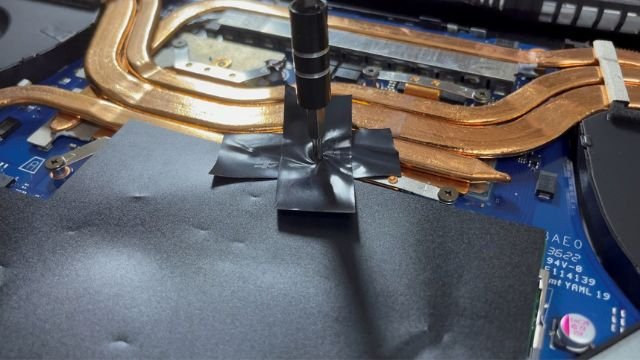
Use a tiny extractor designed for electronics screws. Drill a very shallow pilot if needed, then work the extractor counterclockwise. Go slow to avoid slipping into the chassis.
Method 5 — Create a new slot with a Dremel or tiny file
Cut a new straight slot across the head. Use a thin cutting wheel or small file. Then use a flat-head driver to back the screw out. Wear eye protection and mask metal dust.
Method 6 — Bond a driver to the screw with super glue
Apply a tiny drop of strong adhesive to the driver tip and press into the screw head. Wait until the glue sets. Twist gently. Use this only if you are careful and can avoid glue reaching the laptop’s internals.
Method 7 — Heat a solder joint to remove soldered screws
If the screw is also soldered or has corrosion, warm it slightly with a soldering iron to loosen the threads. Do not overheat. This is for experienced users only.
Method 8 — Drill out the screw (last resort)
Use a tiny drill bit to remove the head, then lift the case and unscrew the stub with pliers. This is destructive and should be a final option.
Short PAA-style questions
What if the driver keeps slipping? Try a fresh, exact-fit bit and a rubber band. If that fails, move to pliers or an extractor.
How deep should I drill for an extractor? Only a shallow pilot, just enough to seat the extractor. Too big risks for the laptop internals.
I once spent 20 minutes on a single fan screw. A rubber band fixed it. That taught me patience and the value of small tricks.

Source: ifixit.com
Tips to prevent stripped screws in the future
Prevention is easy and saves time. Use simple habits when opening or assembling laptops.
- Use correct driver sizes and snug torque: stop when you feel resistance.
- Keep screws organized by size: mix-ups lead to forceful tightening.
- Avoid power drivers on low-torque screws: they slip and strip easily.
- Replace worn screws and bolts with quality OEM parts.
- Use threadlocker sparingly and only where needed: it can make removal harder.
- Work on a soft surface and in good light to avoid slips.
These habits cut the risk of stripping and make future service easy.

Source: youtube.com
When to seek professional help
If screws are near sensitive components or boards, consider a repair shop. Also seek help when a screw is broken flush and buried or when drilling risks damage. Professionals have tiny extractors, proper tools, and experience.
If you value warranty or have little repair experience, avoid risky methods. A shop can open the laptop without harming the circuitry. Getting help can be cheaper than replacing a board.
Source: koolingmonster.com
Frequently Asked Questions on how to remove a stripped laptop screw
What is the safest first step for removing a stripped laptop screw?
Start with the right-sized driver and a wide rubber band. Apply steady downward pressure and turn slowly. This keeps risk low.
Can super glue help remove a stripped laptop screw?
Yes. Use a tiny drop on the driver tip, press into the screw head, and let it cure. Use this only when you can avoid glue contacting internals.
Will drilling out a stripped laptop screw damage my laptop?
Drilling is risky. It can create metal shards or hit components. Use it only if you can protect the internals or after removing the case.
How do I remove a screw that is flush with the laptop surface?
Try a thin extractor or create a new slot with a Dremel. If the head is too damaged, a shop can use microtools to remove it safely.
Can I reuse a screw after removing a stripped laptop screw?
If the head or threads are damaged, replace the screw. Reusing damaged screws risks stripping and loose fittings later.
How long should I try DIY methods before seeing a pro?
If DIY attempts exceed 20–30 minutes or you fear damage, stop and consult a pro. Quick fixes often work, but persistent problems need expertise.
Conclusion
Removing a stripped laptop screw is solvable with the right approach. Start simple: match the driver, use a rubber band, then try pliers or a small extractor. Use harsher methods only as a last resort. From my repairs, patience and proper tools are the best helpers.
Take action now: gather a small precision kit and try the gentle fixes first. If you liked this guide, leave a comment, subscribe, or share your own tip for removing stripped laptop screws.