Featured image is AI-generated and for illustrative purposes only.
Streaming on your TV should be simple, but picking the right device often isn’t. Maybe you just want to relax with a show, but end up scrolling through endless options and technical details.
There are many streaming sticks to choose from, and they all look similar at first. But each one has differences in image quality, speed, how you control it, and even what apps or games you can use. Some are cheap and basic, while others cost more because they add features you might not need. It’s easy to get stuck wondering what actually matters for your setup, or to overpay for extras you won’t use. This guide will help you see what’s different between each type and make it easier to pick the best Fire Stick for TV and your habits.
What Actually Matters When Choosing
For most people, it comes down to picture quality, how smooth the device feels, how you like to search for shows, and if you want extras like smart home controls or gaming. Think about what you watch, where you watch it, and whether you want a simple experience or something that feels high-end.
Below, you’ll see how the main options compare based on features, price, and who each one fits best. Everyone’s needs are a bit different, so focus on what matters to you.
Amazon Fire Tv Stick 4k Plus
The Best Fire Stick for Tv for anyone seeking fast, modern streaming with smart voice controls and future-ready features.

The Amazon Fire TV Stick 4K Plus is a streaming device designed to transform any compatible TV into a smart entertainment hub. With advanced 4K streaming and support for Wi-Fi 6, it solves the common issues of buffering and limited app choices, making it ideal for anyone upgrading an older television or seeking an all-in-one solution.
Using this Fire Stick feels effortless—Alexa+ voice search gets you to your favorite shows or games in seconds, and the new user interface is quick to navigate. Whether you’re catching up on live TV, exploring new movies, or playing Xbox games via the cloud, the experience is smooth and reliable, reducing the time spent scrolling or troubleshooting connections.
- Strengths:
- Ultra-fast 4K streaming, even with multiple devices connected
- Intuitive Alexa+ voice controls for hands-free navigation
- Plays Xbox games via cloud for added versatility
- Modern interface and personalized recommendations
- Consider:
- Requires a 4K TV and Wi-Fi 6 for best performance
- No bundled streaming subscriptions included
Who Will Benefit Most
This Fire Stick is a good fit for families, cord-cutters, or anyone who wants a premium streaming experience without buying a new TV. If you already have a 4K TV and want everything—movies, live channels, and even gaming—conveniently accessible, it’s a straightforward upgrade. However, if your internet is slower or your TV is not 4K, you may not see the full advantage.
Setup is simple, and Alexa+ helps you find what you want without any guesswork. If you’ve ever been frustrated by endless scrolling or clunky menus, this device will make streaming feel refreshingly easy. Take a moment to check your Wi-Fi and TV compatibility before ordering, and you can look forward to stress-free entertainment with confidence.
Amazon Fire Tv Stick 4k Select
The Best Fire Stick for Tv for anyone who wants a simple, fast way to upgrade their streaming experience to crisp 4K with voice control and a modern interface.

The Amazon Fire TV Stick 4K Select is a compact streaming device that brings stunning 4K Ultra HD picture quality to your television, instantly turning any TV into a smart hub with access to all your favorite streaming services. If you’re tired of clunky remotes and endless scrolling, this Fire Stick’s Alexa+ integration and AI-powered search help you find content much faster and more easily.
Setting it up is hassle-free—just plug it into your TV and connect to Wi-Fi. In day-to-day use, navigating between Netflix, Prime Video, Disney+, and more feels smooth and intuitive, with personalized recommendations making it easy to discover new shows. The modern Fire TV interface means less time searching and more time watching, giving you peace of mind that your setup just works.
- What stands out: Reliable 4K HDR streaming, voice-powered search, and a streamlined interface are perfectly suited for anyone wanting to simplify TV time.
- What to consider: Some streaming apps may require separate subscriptions, and you’ll need a compatible 4K TV to get the most from the picture quality.
Is This Your Best Streaming Upgrade?
If you want to make any TV smarter, crave an easier way to find shows, or want to enjoy content in 4K with minimal setup, the Fire TV Stick 4K Select is a strong choice. It’s ideal for families, tech newcomers, or anyone ready to declutter their streaming experience with just one remote and a voice command.
However, if your TV is already smart enough or you don’t stream in 4K, you might not notice a big difference. For everyone else, it takes the stress out of figuring out what to watch or how to watch it, and you’ll appreciate how quickly you can get started—just plug it in and go.
Don’t forget to connect it to your Amazon account for seamless Alexa features.
Amazon Fire Tv Stick Hd With Alexa Remote
The Best Fire Stick for Tv is a smart, affordable choice for anyone seeking simple streaming and Alexa voice control on their HD television.

The Amazon Fire TV Stick HD with Alexa Voice Remote is a compact streaming device designed for HD TVs, making it easy to access all your favorite entertainment in one place. It solves the hassle of complicated TV setups by letting you control streaming, search, and navigation simply by speaking to Alexa, even if you’re new to streaming devices.
In daily use, this Fire Stick feels quick and intuitive. Just plug it into your TV’s HDMI port, connect to Wi-Fi, and you’re ready to browse free and paid apps like Netflix, Disney+, and Prime Video, or catch live TV.
The remote is straightforward, and voice commands save time—whether you’re searching for shows or controlling smart home features.
- Strengths:
- Affordable way to upgrade older HD TVs
- Voice search with Alexa is fast and accurate
- Supports hundreds of streaming apps, including free options
- Portable—easy to take on trips or move between TVs
- Limitations:
- Not designed for 4K TVs—best for HD displays
- Some apps require subscriptions
Is This The Right Fire Stick For You?
If you want a simple, budget-friendly way to stream on an HD TV, the Amazon Fire TV Stick HD is a strong fit—especially if you appreciate hands-free controls with Alexa. It’s ideal for first-time streamers, families upgrading older TVs, or anyone who travels and wants their favorite shows anywhere.
If you have a 4K TV or want advanced video quality, you might prefer a higher-end Fire Stick model. But for everyday streaming and voice convenience, this stick removes tech headaches and makes streaming accessible. Tip: Use Alexa to not only find shows, but also check the weather or control smart home lights. Rest assured, setup is quick and frustration-free.
Amazon Fire Tv Stick 4k Max
The Best Fire Stick for Tv for anyone who wants fast streaming, voice search, and cable-free entertainment in one simple package.

The Amazon Fire TV Stick 4K Max is a refurbished streaming device that brings the power of 4K Ultra HD, Dolby Vision, and lightning-fast app starts to your television. It’s designed for anyone who wants to cut the cable cord and still enjoy free and live TV with seamless navigation—plus, it comes with Alexa voice search for finding movies by actor, plot, or even famous quotes.
In daily use, it feels responsive and intuitive. You can jump into your favorite shows or even cloud-stream Xbox games without fuss, and the Alexa integration means you spend less time searching and more time relaxing. Even though it’s like-new, it’s tested and certified, so you can use it with confidence.
- Strengths:
- Certified refurbished with warranty for peace of mind
- Supports Wi-Fi 6E for faster streaming
- Easy Alexa-powered search and navigation
- 4K Ultra HD, Dolby Vision, and Dolby Atmos support
- Cloud gaming with Xbox Game Pass (subscription/controller required)
- Limitations:
- Game Pass and compatible controller sold separately
- May come in generic packaging
Is This The Right Streaming Stick For You?
If you want a reliable, high-quality streaming experience without paying for cable or satellite, this Fire Stick is an easy choice. It’s especially good if you value quick setup, voice search, and want to try out cloud gaming or enjoy vivid 4K content. The refurbished status means you get the same performance for less, but still with a warranty.
Skip this if you’re deeply tied to another smart TV platform or don’t need 4K/HDR features. Otherwise, you’ll appreciate how much time and hassle Alexa search can save. My tip: take a moment to link your streaming accounts during setup, and you’ll never have to hunt for your favorite shows again.
Amazon Fire Tv Stick 4k Plus Bundle
Best Fire Stick for Tv for users seeking high-quality 4K streaming and hassle-free connectivity in their home entertainment setup.

The Amazon Fire TV Stick 4K Plus Bundle is a compact streaming device that brings advanced entertainment features to your television. It solves the hassle of limited streaming quality and connectivity by supporting Wi-Fi 6, ensuring seamless 4K streaming even if multiple devices are using your network.
Setting up is straightforward—just plug it into your TV’s HDMI and USB ports, and you can instantly access a vast selection of streaming services. The built-in AI-powered Fire TV Search makes finding content quick and easy, and the device powers directly from your TV, eliminating the need for extra outlets or messy cables.
- Strengths:
- Optimized for vibrant 4K Ultra HD viewing
- Dolby Vision, HDR10+, and Dolby Atmos support
- Stable streaming with Wi-Fi 6
- Direct USB power eliminates outlet hunting
- Access to major streaming apps
- Limitations:
- Requires a TV with USB port for direct power
- Subscription fees apply for premium services
Who Will Benefit Most
This Fire Stick is ideal for anyone with a 4K TV who wants a reliable, modern streaming experience without complicated setup or extra wires. If you stream often and value picture and sound quality, it’s a smart choice. Those with older TVs or without a USB port for power may want to double-check compatibility before buying.
It removes the stress of buffering and messy cables, letting you focus on enjoying your favorite shows. Tip: Use the AI search to quickly find content across multiple apps—it saves time and avoids frustration. Rest assured, Amazon’s build quality means the device is designed to work smoothly for years, keeping your entertainment simple and enjoyable.
Amazon Fire Tv Cube With Alexa+
The Best Fire Stick for Tv for tech-savvy viewers who want the fastest streaming and hands-free control with Alexa.
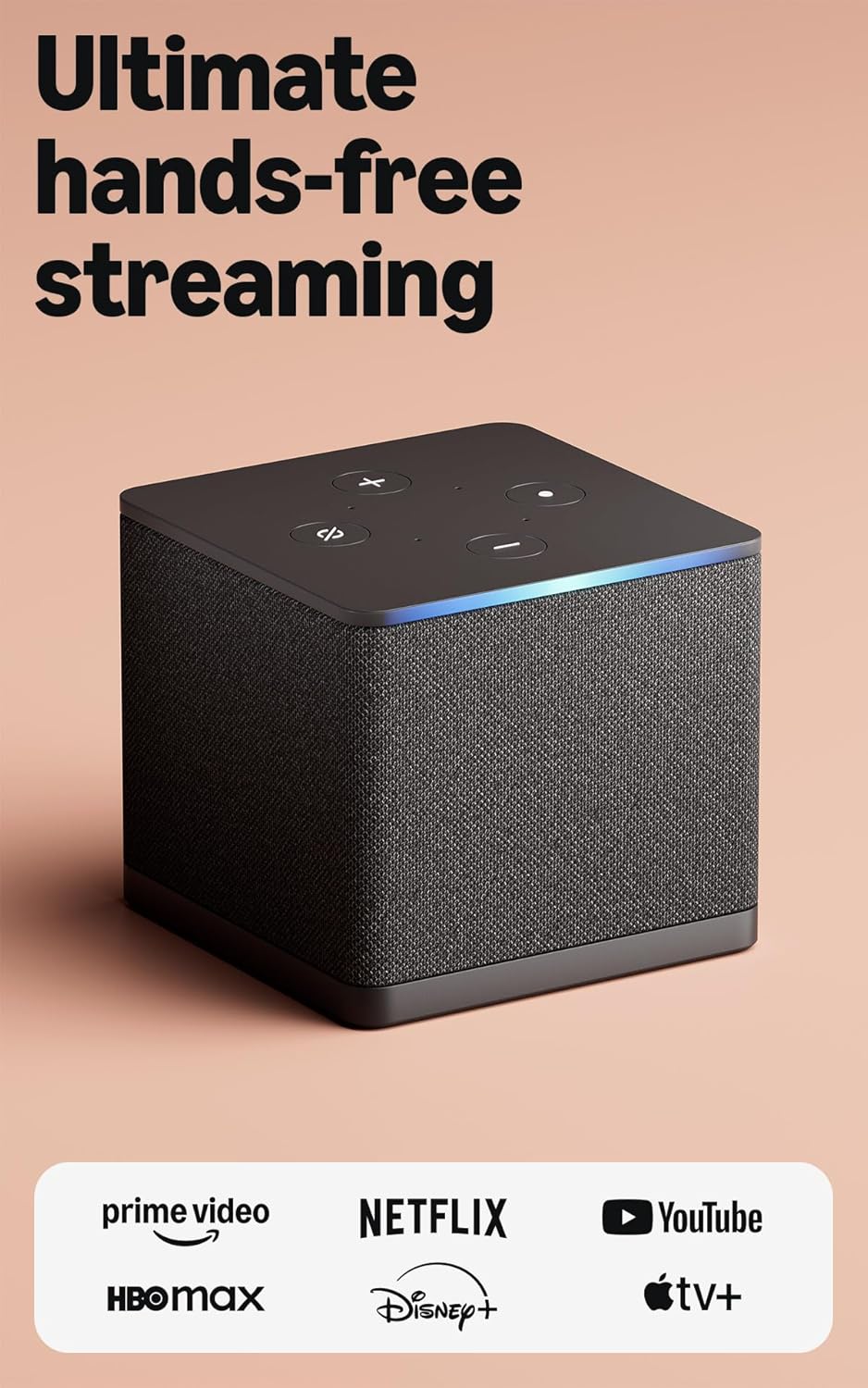
The Amazon Fire TV Cube with Alexa+ is a hands-free streaming device that brings lightning-fast performance and intuitive voice control to your living room. With a powerful octa-core processor, it’s twice as fast as the Fire TV Stick 4K Max, making it perfect for anyone tired of slow app launches and clunky navigation.
In daily use, the Fire TV Cube feels seamless—just ask Alexa to find your favorite shows, control your TV, or manage smart home devices, all without picking up a remote. Switching between streaming, cable, or gaming is quick, so you spend more time enjoying content and less time fumbling with settings.
- Strengths:
- Fastest performance in the Fire TV lineup
- Hands-free Alexa voice control—even across the room
- Modern Fire TV interface with personalized recommendations
- Easy device switching (cable, game console, webcam)
- 4K Ultra HD and Wi-Fi 6E support for top-quality streaming
- Limitations:
- Higher price compared to Fire TV Sticks
- May be overkill for very basic streaming needs
Is This Fire Tv Cube Right For You?
If you want a streaming device that feels as fast and responsive as a premium smart TV—and you’d love to control everything hands-free—the Fire TV Cube is a stress-free solution. It’s ideal for busy families, tech enthusiasts, or anyone who values voice commands and seamless device integration.
Those who just need a simple, budget streamer might find this device more than they need. But if you want to future-proof your setup and reduce remote-clutter anxiety, this Cube brings confidence and convenience. Place it centrally for the best Alexa experience, and enjoy knowing you can just ask for what you want—no digging through menus required.
Amazon Fire Tv Stick 4k With Alexa
The Best Fire Stick for Tv for anyone who wants a reliable, next-gen streaming device with easy voice search and smooth 4K performance.
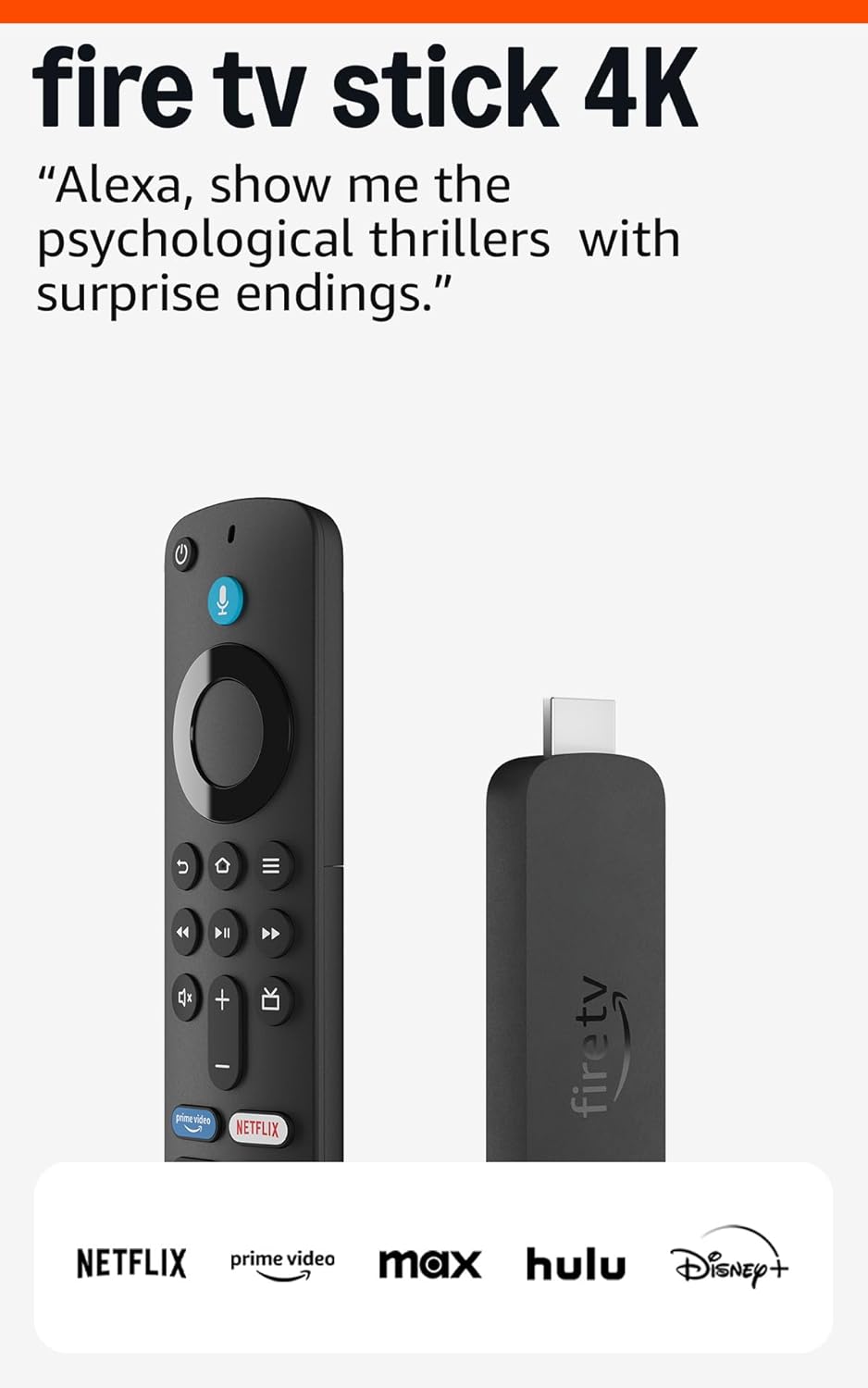
This Fire TV Stick 4K is a like-new, certified refurbished model from Amazon, designed for people who want a plug-and-play streaming solution. It solves the hassle of slow, laggy streaming by supporting Wi-Fi 6, which means you’ll get smooth 4K video even if your home network is crowded with devices.
Using Alexa, you can search for movies by actor, plot, or even memorable lines—just speak into the remote and let it do the heavy lifting. The interface feels intuitive, and the experience is seamless, making it easy to switch between live TV, streaming apps, and even cloud gaming without any fuss.
- Strengths: Refurbished to like-new condition with warranty; fast Wi-Fi 6 support; powerful voice search with Alexa; 4K streaming optimized for modern TVs; cloud gaming capabilities with Xbox Game Pass.
- Consider: Comes in a generic box, not original retail packaging.
- Best for: Households needing reliable streaming, those who use Alexa, and anyone interested in occasional cloud gaming without buying a console.
Who Will Appreciate This Fire Stick
If you need a streaming device that’s easy to set up, rarely buffers, and lets you find shows or movies quickly, this Fire TV Stick 4K is a solid fit. It’s ideal for families, tech-savvy users, or anyone upgrading an older smart TV without built-in voice search or 4K capability.
If you’re looking for something brand new in sealed retail packaging, or you don’t need 4K or Alexa voice features, you might want to consider other options. For most people, though, this stick takes the stress out of streaming—just plug it in and start watching. Remember, you can use Alexa for more than TV: try asking about weather or controlling smart home devices for extra convenience.
Finding The Right Fire Stick For Your Tv Setup
Start by thinking about how you actually use your TV and streaming apps. Consider whether you want simple HD streaming or the best performance for a 4K home theater. Weigh features like hands-free voice control, smart home integration, and game streaming against their cost.
If you travel often or need something portable, factor that in. Let your own habits guide your choice, not just specs.
Common Missteps When Picking A Fire Stick
- Choosing a high-end model for a basic HD TV you rarely use.
- Expecting cable-like live TV channels without extra apps or fees.
- Overlooking Wi-Fi compatibility with your home network.
- Assuming all models support hands-free voice or advanced gaming features.
- Buying refurbished if you want original packaging or the newest software updates.
Benefits of Using the Best Fire Stick for TV
- Turns almost any TV into a smart streaming device.
- Provides quick access to popular streaming apps and services.
- Delivers smooth, fast, and reliable streaming performance.
- Supports HD, 4K, HDR, and Dolby Vision on compatible models.
- Makes searching easier with Alexa voice control.
- Offers a simple setup that takes only a few minutes.
- Receives regular software and security updates from Amazon.
- Lets you carry your streaming device while traveling.
- Works with many TVs that have an HDMI port.
- Gives excellent value for affordable home entertainment.
Best Fire Stick For TV: Frequently Asked Questions
Does The Fire Stick Work With Any Tv?
Most TVs with an HDMI port will work with a Fire Stick. Just make sure your TV supports the resolution you want.
Is There A Real Difference Between Hd And 4k Fire Sticks?
If your TV is only HD, a 4K Fire Stick won’t improve picture quality. For 4K TVs, a 4K model is worth it.
Do All Fire Sticks Require A Subscription?
No subscription is needed for the device itself. Some streaming apps may require their own fees.
Can I Use A Fire Stick If My Wi-fi Isn’t The Newest?
Yes, but newer Fire Sticks support faster Wi-Fi for smoother streaming. Older networks may limit performance.
Is Hands-free Alexa Available On All Fire Stick Models?
No, only some models like the Fire TV Cube have built-in hands-free voice control. Most use a remote for Alexa.
Are Refurbished Fire Sticks A Good Idea?
They can be a good value if you’re comfortable with generic packaging and possible minor signs of use. Warranty coverage is usually similar to new devices.
Will The Fire Stick Control My Other Devices?
Some models let you control your TV or soundbar, but not every device is compatible. Check your equipment before deciding.
Key Features to Compare Before Buying
Before choosing the Best Fire Stick for TV, compare the features that matter most for your viewing habits. Start by checking the maximum streaming resolution, such as Full HD or 4K. Next, look for HDR formats like Dolby Vision or HDR10+ if your TV supports them. Processor speed and memory also affect how quickly apps open and switch. A voice remote with Alexa can make searching and controlling playback much easier.
Make sure the device supports the streaming apps you use most often. Wi-Fi performance is another important factor, especially for smooth 4K streaming. If you enjoy immersive audio, look for Dolby Atmos support on compatible models. Also, consider the available storage and overall interface responsiveness for everyday use. Finally, compare the price with the features offered to find the best value for your budget.
Final verdict
Choosing a Fire Stick is about matching features to how you actually watch TV and what you care about. There’s no perfect answer for everyone, so trust your own preferences and habits.
Whether you want something simple or more advanced, any choice here will get you streaming. Pick what fits your life, and enjoy your shows with less second-guessing.
Disclaimer
“As an Amazon Associate, we earn from qualifying purchases. If you purchase through links on our site, we may earn a commission at no additional cost to you.”