Choosing between Kindle Paperwhite Vs Colorsoft comes down to how you prefer to read. Both are modern eBook readers with a sleek design and practical features. They are made for long reading sessions and travel. The main difference is the display: Paperwhite is optimized for black and white, while Colorsoft offers a color experience. After reading this review, you’ll know which fits your reading style and daily habits.
Quick Guide For Picking The Right Kindle
- Choose “Paperwhite Fast Reader” if you want faster page turns and a simple black-and-white experience.
- Pick “Colorsoft Color Edition” when seeing book covers and highlights in color matters to you.
- Paperwhite Fast Reader fits those who want fewer distractions and longer battery life.
- Colorsoft Color Edition suits readers who enjoy highlighting passages in different colors.
- Paperwhite Fast Reader is ideal for bright sunlight reading, while Colorsoft Color Edition stands out for visual content.
How These Ebook Readers Feel Day-to-day
Using the Paperwhite Fast Reader is straightforward. It offers a sharp, glare-free screen. There are no distractions, and adjusting the display for sunlight or darkness is easy. Battery life lasts for weeks, so charging rarely crosses my mind.
With Colorsoft Color Edition, reading feels lively. Book covers and passages stand out in color. Adjusting the display is simple, and highlighting scenes in yellow, orange, blue, or pink adds a fun touch. The device is still compact and comfortable for daily reading.
Paperwhite Fast Reader At A Glance
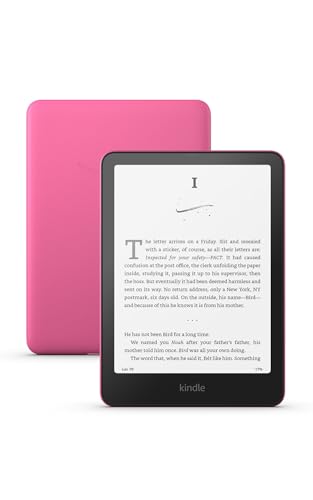
Where Paperwhite Fast Reader Fits Best
- Long reading sessions without frequent charging.
- Minimalist, distraction-free reading environment.
- Reading outdoors with a glare-free screen.
- Quick navigation and fast page turns.
Where Paperwhite Fast Reader Struggles
- No color display for covers or highlights.
- Less engaging for readers who enjoy visual content.
Colorsoft Color Edition At A Glance

Where Colorsoft Color Edition Fits Best
- Readers who like seeing book covers and illustrations in color.
- Highlighting text in multiple colors for study or enjoyment.
- Those who want a lively, visual reading experience.
- Reading in various lighting conditions with adjustable display.
Where Colorsoft Color Edition Struggles
- Battery life is shorter compared to Paperwhite Fast Reader.
- Color display may be less sharp in direct sunlight.
Comparing Everyday Reading With Kindle Paperwhite Vs Colorsoft
I compared how each device handles daily reading, focusing on display clarity, highlighting, battery life, and comfort. Both have a similar size and weight, making them easy to hold. The main differences show up with page turns, color features, and how long they last between charges.
Adjusting the display for different lighting is simple on both. The choice depends on your reading habits and preferences.
Display Experience: Black & White Vs Color
The Paperwhite Fast Reader offers a crisp black-and-white display. Colorsoft Color Edition brings book covers and content to life with color. The difference is noticeable with visual-heavy books.
| Aspect | Paperwhite Fast Reader | Colorsoft Color Edition |
|---|---|---|
| Display Type | Black & White, high contrast | Color, high contrast |
| Book Covers | Monochrome only | Colorful display |
| Highlighting | Single color | Multiple colors |
| Visual Engagement | Basic | Enhanced |
| Eye Comfort | Glare-free | Paper-like color |
Ratings: Paperwhite Fast Reader – 8.5/10 | Colorsoft Color Edition – 8/10
Edge: Paperwhite Fast Reader is better for pure text readers.
Battery Life In Real Use
Battery life makes a difference for frequent readers. Paperwhite Fast Reader lasts much longer on a single charge. Colorsoft Color Edition needs charging a bit more often.
| Aspect | Paperwhite Fast Reader | Colorsoft Color Edition |
|---|---|---|
| Battery Duration | Up to 12 weeks | Up to 8 weeks |
| Charging Port | USB-C | USB-C |
| Usage Per Charge | Extended sessions | Moderate sessions |
| Peace of Mind | Rarely needs charging | Needs more regular charging |
Ratings: Paperwhite Fast Reader – 9/10 | Colorsoft Color Edition – 7.5/10
Edge: Paperwhite Fast Reader suits heavy readers.
Highlighting And Study Features
Highlighting passages is more versatile on Colorsoft Color Edition. Paperwhite Fast Reader keeps it simple with standard highlights.
| Aspect | Paperwhite Fast Reader | Colorsoft Color Edition |
|---|---|---|
| Highlight Colors | Single (default) | Yellow, orange, blue, pink |
| Study Use | Basic | Advanced |
| Note Features | Standard | Enhanced with color |
| Visual Feedback | Minimal | Rich |
| Learning Engagement | Simple | More dynamic |
Ratings: Paperwhite Fast Reader – 7.5/10 | Colorsoft Color Edition – 8.5/10
Edge: Colorsoft Color Edition is better for visual learners and note-takers.
Portability And Comfort
Both devices are lightweight and easy to carry. They fit comfortably in a bag or hand. Design and dimensions are nearly identical.
| Aspect | Paperwhite Fast Reader | Colorsoft Color Edition |
|---|---|---|
| Weight | 0.47 Pounds | 0.47 Pounds |
| Dimensions | 6.96 x 5.02 x 0.31 in | 6.96 x 5.02 x 0.3 in |
| Grip | Comfortable | Comfortable |
| Travel Readiness | High | High |
Ratings: Paperwhite Fast Reader – 8/10 | Colorsoft Color Edition – 8/10
Edge: No clear winner, both are equally portable.
Distraction-free Reading
Paperwhite Fast Reader keeps distractions away with no social media or notifications. Colorsoft Color Edition offers similar focus but with more visual engagement.
| Aspect | Paperwhite Fast Reader | Colorsoft Color Edition |
|---|---|---|
| Distraction Level | Low | Low |
| App Presence | No extra apps | No extra apps |
| Focus on Reading | Strong | Strong |
| Visual Distraction | Minimal | Some with color |
| Reading Flow | Smooth | Smooth |
| Customization | Display only | Display and highlights |
Ratings: Paperwhite Fast Reader – 8.5/10 | Colorsoft Color Edition – 8/10
Edge: Paperwhite Fast Reader is more minimalist.
Living With An Ebook Reader Long Term
Paperwhite Fast Reader is easy to learn and use. Over time, it stays consistent and reliable. There’s peace of mind knowing the battery lasts and the interface remains simple. Trust builds as it never distracts or surprises you.
Colorsoft Color Edition is also straightforward to master. The color features add a layer of engagement for those who value visuals. It keeps reading interesting, especially with color highlights. Consistency is steady, though battery needs a bit more attention.
Which Kindle Suits Your Reading Style?
Paperwhite Fast Reader is ideal for readers who want a classic, distraction-free experience. It’s best for those who prefer long battery life, fast navigation, and reading mainly text-based books. Choose it if simplicity and endurance matter most to you.
Colorsoft Color Edition is suited for readers who enjoy visuals and highlighting. If seeing book covers in color or marking passages in different hues appeals to you. This Kindle is a better match. It’s especially good for students or those who read visually rich content.
Both are dependable choices for daily reading, each with a clear focus on user comfort.
Common Questions On Kindle Paperwhite Vs Colorsoft
Is The Colorsoft Color Edition Display Harder On The Eyes?
No, the Colorsoft screen is designed to be easy on the eyes. It offers a paper-like color and adjustable light, similar to Paperwhite.
Does Paperwhite Fast Reader Support Color Highlights?
No, highlighting is limited to standard color. If you need multiple highlight colors, Colorsoft Color Edition is better.
How Often Do I Need To Charge Each Device?
Paperwhite Fast Reader lasts up to 12 weeks on a single charge. Colorsoft Color Edition lasts up to 8 weeks, so needs charging more frequently.
Can Both Devices Display Book Covers In Color?
No, only Colorsoft Color Edition shows book covers and illustrations in color. Paperwhite Fast Reader displays everything in black and white.
Are Both Kindles Suitable For Outdoor Reading?
Yes, both have glare-free displays and adjustable lighting. Paperwhite Fast Reader may be slightly better in direct sunlight.
Is There A Learning Curve For Using These Kindles?
Both are simple to set up and use. Features are easy to find and adjust, so even new users can start reading quickly.
Do Either Of The Kindles Have Distracting Apps?
No, both devices are focused on reading. There are no social media or notification distractions built in.