Power off, unplug, remove the battery, tilt and blot, then dry for 24–72 hours before testing.
I’ve helped dozens of people recover laptops after spills, and I’ve saved at least two machines from permanent failure. This guide explains how to get water out of laptop safely and fully. I’ll walk you through immediate steps, tools, careful drying methods, internal cleaning tips, testing steps, and when to call a pro. Read on and follow these easy, proven actions to improve the chance your laptop survives a water accident.

Immediate steps to take right after a spill
Act fast. The first minute matters more than anything else when learning how to get water out of laptop.
- Power off the laptop immediately. Leaving it on risks short circuits.
- Unplug the charger. Remove any connected devices or external drives.
- Remove the battery if the model allows it. This cuts all power to the system.
- Tilt and drain. Open the screen 90 degrees and turn the laptop upside down in an inverted V position to let water run out.
- Blot visible water with a microfiber cloth. Do not rub hard.
Do these actions within the first two minutes. They reduce the chance of shorts and corrosion and are core to how to get water out of laptop effectively.
Source: youtube.com
Tools you’ll need
Having the right tools makes how to get water out of laptop faster and safer.
- Microfiber cloth for blotting and wiping.
- Small Phillips and Torx screwdrivers for models you can open.
- Isopropyl alcohol 90% or higher for cleaning circuit boards (only for advanced users).
- Canned compressed air or a gentle electric blower for pushing out trapped moisture.
- Silica gel packets or moisture absorbers for drying.
- Small plastic container and anti-static wrist strap if you open the laptop.
I keep a small “spill kit” in my desk. It saved my work laptop once when coffee hit the keyboard. Preparedness helps when learning how to get water out of laptop.

Source: reddit.com
Step-by-step drying process for non-invasive users
Follow these steps if you don’t want to open your laptop. They are safe and effective for most water-only spills.
- Power off, unplug, remove battery, and drain. Repeat immediate steps above.
- Blot all visible water with a microfiber cloth. Focus on ports and keyboard seams.
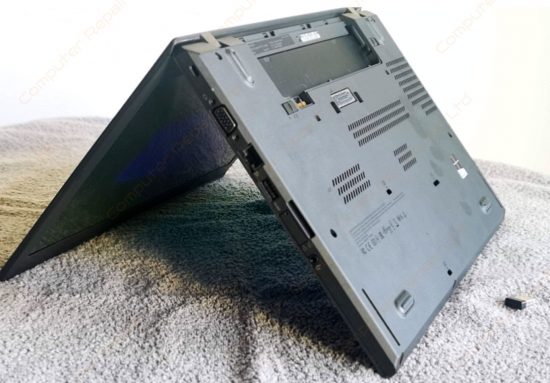
- Position the laptop in an inverted V shape (keyboard facing down) on a towel. This aids drainage.
- Place silica gel packets around the laptop or set it in a well-ventilated room with a dehumidifier.
- Use a fan at low speed to create airflow across the keyboard and vents. Keep the airflow cool.
- Wait 24 to 72 hours before attempting to power on. More time is better than less.
These steps show how to get water out of laptop without opening it. Rice is often suggested but is less effective than silica gel and can leave dust behind.
Source: co.uk
Advanced internal drying and cleaning (for confident users)
If the laptop still shows problems, or if you spilled sugary, salty, or alcoholic liquids, internal cleaning is often necessary. Only proceed if you are comfortable and have the right tools.
- Remove the back cover and ground yourself with an anti-static strap.
- Disconnect the battery cable if the battery can’t be removed externally.
- Remove the SSD/HDD and RAM if you want to protect them from moisture.
- Blot internal water with lint-free cloths. Use compressed air to dry crevices. Keep bursts short and angled.
- For sticky spills, lightly clean affected areas with 90%+ isopropyl alcohol on a lint-free swab. Alcohol displaces water and evaporates quickly.
- Allow the motherboard and components to dry for 48–72 hours in a warm, dry room. Place silica gel packets nearby.
- Reassemble and test only after you’re confident everything is dry.
I opened a laptop after a soda spill once. The keyboard membrane had sticky residue; a careful alcohol wipe fixed it. That real-world fix taught me to prioritize cleaning when liquids other than water are involved.

Source: reddit.com
How long to wait and how to test your laptop
Patience is a core part of how to get water out of laptop. Rushing the test can cause permanent damage.
- Minimum wait time for water-only spills: 24 hours. Better: 48–72 hours.
- For large spills or sugary liquids: wait at least 72 hours and consider internal cleaning first.
- When testing, start without battery if possible. Plug in the charger and power on briefly.
- Check the display, keyboard, trackpad, speakers, ports, and Wi-Fi. Look and smell for corrosion or burning.
- Backup data immediately if the laptop starts. Liquid damage can worsen.
If the laptop shows strange behavior—random shutdowns, missing keys, distorted sound—power off and seek repair. These symptoms indicate lingering moisture or damage that simple drying can’t fix.

Source: wikihow.com
When to seek professional help
Not all spills are safely handled at home. Know when to stop and call an expert.
- You spilled coffee, soda, salt water, or alcohol; these liquids leave corrosive residues.
- The laptop won’t power on after 72 hours of drying.
- You notice burning smells, visible corrosion, or bent connectors.
- You lack the tools or confidence to open the case safely.
Professional technicians can disassemble, ultrasonically clean boards, replace corroded parts, and run diagnostics. This raises the odds of recovery when learning how to get water out of laptop at home is no longer enough.

Source: reddit.com
Prevention tips to avoid future spills
Prevention saves time and money. These habits reduce the risk and severity of liquid damage.
- Keep drinks away from the laptop. Use spill-proof containers or a different surface.
- Use a keyboard cover for extra protection. They are inexpensive and effective.
- Set up a dedicated desk area with no liquids near electronics.
- Enable cloud sync and frequent backups to protect data in case recovery fails.
- Consider insurance or extended warranties that cover accidental damage.
I started using a laptop stand and a small shelf for drinks after my spill incident. The small change prevented another scare and is an easy tip for anyone thinking about how to get water out of laptop before it happens.

Source: youtube.com
Common quick questions
Here are short answers to common PAA-style questions people ask while searching how to get water out of laptop.
Can I use rice to dry my laptop?
Rice can absorb some moisture but is less effective than silica gel. It may also introduce dust and is not recommended as the primary method.
Is a hairdryer safe to dry a laptop?
A hairdryer on high heat can warp plastics and drive moisture deeper. Use a fan with cool air or a low-heat setting very gently if needed.
How long before I can turn the laptop back on?
Wait at least 24 hours for small water spills and 48–72 hours for larger spills. Longer is safer.

Source: reddit.com
Frequently Asked Questions of how to get water out of laptop
What is the first thing I should do after water spills on my laptop?
Turn the laptop off, unplug it, remove the battery if possible, and tilt it to drain. Quick power removal prevents short circuits.
Can I open my laptop to dry it myself?
You can if you’re comfortable and have basic tools and an anti-static strap. If the device is under warranty or you’re unsure, seek professional help.
Will water damage my hard drive or SSD?
Hard drives can suffer from moisture if not removed quickly. SSDs are more tolerant but still at risk. Remove storage and back up data if the laptop powers on.
Do warranties cover water damage?
Most standard warranties don’t cover accidental liquid damage. Check your warranty and consider accidental damage protection for future coverage.
How long does it take to fix corrosion caused by water?
Cleaning visible corrosion can take a few hours for a technician. Parts replacement and testing can take several days depending on part availability.
Conclusion
You can significantly increase the odds of recovery if you act fast and follow the right steps. Power down, drain, dry, and wait patiently—those steps form the backbone of how to get water out of laptop. If the spill involved sugary or corrosive liquids, or if the laptop won’t behave after thorough drying, get professional help. Try the steps above, protect your data, and consider simple prevention tools like keyboard covers and backups. If this guide helped, leave a comment about your experience or share the article so others know how to handle a spill.