Using a MacBook Pro every day, you want a mouse that just works. But finding the right one can feel overwhelming.
There are many options out there—some are made to match Apple’s look, others focus on comfort or extra features. You might wonder if you need something simple or something with lots of buttons. There are choices between Bluetooth and USB receivers, different sizes, and various prices. Some mice are quiet, some glide smoothly, and some last longer on a charge. The more you compare, the more trade-offs appear. A mouse that feels great might not be the easiest to carry. One that’s cheap might not last as long. Higher-end options promise more, but cost more too.
This article will help you understand the differences so you can pick the mouse that suits how you work. Below, you’ll see seven mice for MacBook Pro users. Each one stands out for a different reason—whether it’s comfort, portability, quiet clicks, or price. Depending on what matters most to you, one of these will fit your daily routine better than the others.
Apple Magic Mouse – White Multi-touch
Included in our Best 7 Mouse for MacBook Pro, this pick is ideal for Mac users who want a seamless, gesture-driven experience straight out of the box.

The Apple Magic Mouse is a wireless, rechargeable mouse designed specifically for Mac users who want a smooth and intuitive navigation experience. Its standout feature is the Multi-Touch surface, which makes swiping between web pages and scrolling through documents effortless—no extra buttons or complex setups needed.
In daily use, the Magic Mouse feels natural and responsive. It’s ready to pair instantly with your Mac, and the rechargeable battery can last for a month or more between charges, so you won’t be searching for spare batteries. The lightweight, low-profile design glides easily and blends right into your workspace.
- Strengths: Incredibly simple pairing with Mac, premium build, and gesture controls that feel native to macOS.
- Limitations: The low profile might not suit those who prefer a larger, more contoured mouse.
| Color | White |
| Dimensions | 1.42″ H × 2.91″ W × 5.12″ L |
| Weight | 0.5 lbs |
Is This The Right Mouse For You?
If you want a mouse that integrates perfectly with your Macbook Pro and puts gesture navigation at your fingertips, the Magic Mouse is a smart choice. It’s best for users who value a clean desktop setup and don’t require extra buttons for gaming or complex workflows.
Those who prefer a taller or more sculpted mouse shape might find it less comfortable over long sessions. But for everyday browsing, creative work, and productivity, it removes the stress of compatibility and setup. My tip: keep the included USB-C cable handy for easy charging—just a quick plug-in and you’re set for weeks. If you’re after reliability and a native Mac feel, you can trust the Magic Mouse to just work, letting you focus on your tasks instead of your tools.
Peibo Silver Bluetooth Wireless Mouse
A top choice in the Best 7 Mouse for Macbook Pro for users who need a reliable, travel-friendly mouse that connects seamlessly to multiple devices.

The PEIBO Silver Bluetooth Wireless Mouse is a compact and versatile mouse designed for MacBook Pro users who value smooth connectivity and portability. It solves the hassle of compatibility by supporting both Bluetooth and USB receiver modes, making it a practical option for those who switch between devices or work environments.
In daily use, this mouse feels comfortable thanks to its ergonomic, pocket-sized design and skin-like coating, while the silent buttons mean you can work in any setting without disturbing others. The automatic sleep mode and rechargeable battery help ensure you spend less time worrying about power and more time getting things done with confidence.
- Works with macOS, iPadOS, Windows, Chrome OS, Linux, and more
- Switchable dual connectivity: Bluetooth and 2.4G USB receiver (includes USB-C adapter)
- 3 adjustable DPI levels for precision
- Silent clicks and energy-saving sleep mode
- Ultra-slim, lightweight, and easy to travel with
Who Will Appreciate This Mouse?
If you need a reliable mouse for your MacBook Pro that also works with your other devices, this PEIBO model is an easy fit—especially for students, travelers, or anyone working in quiet spaces. If you prefer a larger, more sculpted mouse or need advanced programmable buttons, you might want to look elsewhere.
This mouse takes the guesswork out of connectivity and battery life, letting you focus on your work. For best results, remember to charge it regularly and enjoy the flexibility it brings to your tech setup.
Logitech Mx Master 3s Bluetooth Mouse
Among the Best 7 Mouse for Macbook Pro, this is ideal for professionals who want seamless Mac compatibility and precision control.

The Logitech MX Master 3S Bluetooth Mouse is a high-end, ergonomic wireless mouse designed specifically for advanced workflows on MacBook Pro and other devices. Its standout feature is the 8K DPI sensor, allowing for precise tracking on virtually any surface, including glass, so you’re not limited by your workspace.
In real-life use, the quiet clicks and ultra-fast MagSpeed scrolling make working long hours much more pleasant and less distracting. The Bluetooth-only connection means you won’t need to occupy a USB port, which is especially helpful on a MacBook Pro with limited ports.
- Strengths:
- Quiet, satisfying clicks reduce office noise
- Exceptional tracking on glass and other surfaces
- Ergonomic design supports comfortable extended use
- No USB receiver required—perfect for MacBooks
- Limitations:
- No USB receiver included—Bluetooth only
- Charging cable not included
Is This The Right Mouse For You?
If you use your MacBook Pro for creative, analytical, or productivity tasks, and you value quiet operation and precise control, the MX Master 3S is a smart choice. Its comfort and versatility make it a favorite for designers, coders, and anyone who spends hours at their desk.
If you prefer a mouse with a USB receiver, or need a bundled charging cable, you may want to consider other options. For everyone else, this mouse takes the stress out of pairing and daily use—just connect via Bluetooth and enjoy. Tip: Make sure your MacBook Pro’s Bluetooth is enabled before setup for the smoothest experience.
Logitech M720 Triathlon Wireless Mouse
Included in our Best 7 Mouse for Macbook Pro, the Logitech M720 Triathlon is an excellent choice for users who need seamless multitasking across multiple devices.

The Logitech M720 Triathlon Wireless Mouse is a versatile tool designed for anyone who frequently switches between a MacBook Pro and other devices. With dual connectivity via Bluetooth or USB receiver and the ability to control up to three computers at once, it’s built to eliminate the hassle of juggling multiple mice.
This mouse feels sturdy and comfortable, especially for right-handed users thanks to its sculpted rubber grip. Navigating long documents is effortless with its hyper-fast scroll wheel, and I found switching between my MacBook Pro, PC, and tablet nearly instant. The impressive battery life means you can focus on your work, not on charging.
- Strengths:
- Easy device switching for multitaskers
- Extremely long battery life (up to 2 years)
- Comfortable ergonomic design
- Works with macOS, Windows, Linux, Chrome OS, and iPadOS
- Limitations:
- Best suited for right-handed users
- Not ambidextrous
Who Will Love The M720 Triathlon?
If you’re always moving between your MacBook Pro and other devices, this mouse can make your workflow much smoother. It’s perfect for users who value flexibility and need reliable performance across platforms. Those who want a set-and-forget battery experience will appreciate not having to think about replacements for months at a time.
Left-handed users or those who want something ultra-portable may want to look at other options. For everyone else, setting up the M720 is simple, and once you’ve paired it, you can switch devices with a single button press—no more plugging and unplugging. Rest assured, this mouse is built for daily reliability, making multitasking less stressful and more intuitive.
Logitech Mx Master 4 For Mac
As part of the Best 7 Mouse for Macbook Pro, this mouse is ideal for Mac users who want comfort, precision, and seamless integration with Apple devices.
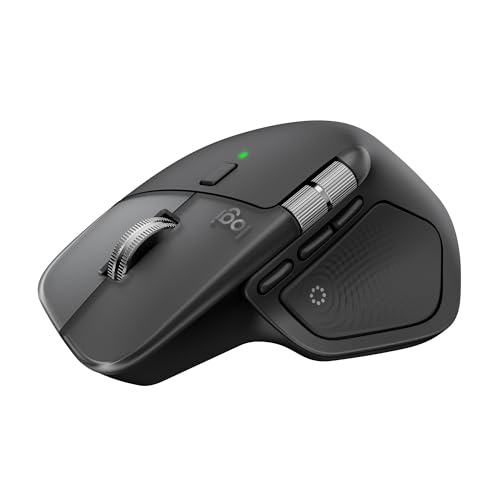
The Logitech MX Master 4 for Mac is a premium ergonomic mouse designed specifically to blend into an Apple workspace. Its advanced haptic feedback panel provides a tactile, customizable experience, which is especially helpful for users who want more control and precision in creative or productivity workflows.
In daily use, the mouse feels natural in hand and noticeably reduces wrist strain thanks to its shape and thumb wheel. Actions like navigating large spreadsheets or editing images become faster and more comfortable, and the ultra-fast MagSpeed scroll makes skimming long documents effortless.
- Strengths:
- Ergonomic design minimizes hand fatigue during long sessions
- Customizable haptic feedback for shortcuts and alerts
- Ultra-fast, precise MagSpeed scroll wheel
- USB-C charging works while you use the mouse
- Seamless compatibility with macOS and iPadOS
- Limitations:
- USB-C charging cable not included
- May feel large for users with very small hands
Is This The Right Mouse For You?
If you spend hours each day working on your MacBook Pro and value comfort, customization, and a premium scroll experience, the MX Master 4 for Mac is a strong choice. Designers, coders, and power users who work with multiple apps will especially appreciate the Actions Ring and haptic feedback.
However, if you travel often and need a very compact or ultra-light mouse, you may want to consider a smaller model. For most Mac users looking to reduce hand fatigue and increase workflow efficiency, this mouse helps eliminate micro-discomfort and makes navigation feel intuitive. Take a moment to personalize your shortcuts in Logi Options+—it’s worth it for the productivity boost.
Logitech Signature M650 L Wireless Mouse
Among the Best 7 Mouse for Macbook Pro, this option is ideal for users with larger hands seeking comfort and quiet performance.

The Logitech Signature M650 L Wireless Mouse is designed for those who want a reliable and comfortable mouse for their MacBook Pro. Its ergonomic shape, soft thumb area, and rubber side grips make it especially well-suited for larger hands, solving the common issue of discomfort during extended use. The silent clicks feature is a practical benefit for anyone working in shared spaces.
In day-to-day use, this mouse feels intuitive and effortless, offering both Bluetooth and USB receiver connectivity so you can switch between devices quickly. Customizable side buttons and Smart Wheel scrolling help streamline tasks, making it easy to stay productive without distractions. The overall experience is smooth and tailored for focus.
- Strengths:
- Comfortable for large hands
- Quiet clicks reduce distractions
- Easy Bluetooth or USB connection
- Customizable side buttons for shortcuts
- SmartWheel for precise or fast scrolling
- Limitations:
- May feel bulky for smaller hands
- No advanced gesture support for macOS
Who Will Appreciate This Mouse
This mouse is an excellent choice for MacBook Pro users who value comfort and quiet operation, especially if you have larger hands. It’s also a good fit for anyone who wants a simple, reliable wireless mouse with customizable buttons and easy switching between devices. If you tend to work long hours or dislike noisy clicks, you’ll find it removes daily irritation and helps you focus.
If you prefer compact mice or advanced gesture controls, you may want to look elsewhere. For everyone else, setting up is quick—just connect via Bluetooth or the USB receiver—and you’ll notice the difference in comfort. You can always customize the side buttons for your favorite shortcuts, making your workflow even smoother.
Logitech Mx Anywhere 3s For Mac
Among the Best 7 Mouse for Macbook Pro, this model is ideal for Mac users seeking a portable, quiet, and precise wireless mouse for all environments.

The Logitech MX Anywhere 3S for Mac is a compact, wireless Bluetooth mouse that’s fully optimized for Apple users. Designed to match Apple aesthetics and engineered for macOS compatibility, it’s a solution for those who need seamless tracking on any surface—even glass—thanks to its advanced 8K DPI sensor.
In daily use, the mouse feels responsive and incredibly quiet, with clicks that won’t disturb your workflow or those around you. Its small size makes it perfect for tossing in a bag alongside your MacBook Pro, while USB-C charging ensures you stay powered up without hunting for extra cables.
- Strengths:
- Works perfectly on any surface, including glass
- Quiet click mechanism reduces distractions
- Compact and lightweight, ideal for travel or hybrid work
- USB-C charging is modern and convenient
- MagSpeed scroll wheel is both fast and precise
- Potential Limitations:
- May be too small for users who prefer a larger mouse
- Optimized for Mac—PC users might want to look elsewhere
Is This Mouse Right For You?
If you’re a MacBook Pro user who frequently works on the go, values quiet environments, or wants a mouse that just works anywhere you set it down, this is an easy pick. However, those with larger hands or who need a mouse for gaming may want to consider something bigger or more specialized.
This mouse streamlines your workspace and eliminates noise-related stress. To get the most out of it, make sure to install Logi Options+ for custom controls. Rest assured: its build quality and Apple-centric design mean it will blend smoothly into your everyday routine without fuss.
How To Approach Picking A Mouse For Your Macbook Pro
Start by thinking about where and how you use your MacBook Pro most. Comfort matters if you work long hours, while portability is key if you travel often. Consider whether you value quiet operation, advanced features, or simple reliability. Each style has trade-offs, so reflect on your habits and workspace before narrowing your choices.
Common Mistakes And Who Should Look Elsewhere
- If you expect every mouse to work perfectly with all devices, compatibility issues may surprise you.
- Those wanting a traditional wired mouse experience may find these options frustrating.
- Users who dislike software customization or extra buttons may not enjoy more advanced models.
- If you need ultra-lightweight or ambidextrous mice, some shapes and sizes may not fit your needs.
- Anyone hoping for a one-size-fits-all solution should reconsider; personal comfort varies widely.
Frequently Asked Questions About The Best 7 Mouse For Macbook Pro
Will These Mice Work With Both Macos And Windows If I Switch Between Devices?
Most models are cross-platform, but check for full compatibility with your operating systems. Some features may be Mac-specific or require additional setup on Windows.
Do I Need Special Drivers Or Software For Advanced Functions?
Some advanced features and customization options require installing vendor software. Basic pointing and clicking usually work without extra steps.
Is Battery Life A Concern With Bluetooth Mice?
Rechargeable models can last weeks between charges, but always review your usage patterns. Swappable battery options may suit those who forget to charge.
Are These Mice Comfortable For Left-handed Users?
Many designs are right-hand focused. Left-handed users may want to seek out truly ambidextrous models for better comfort.
Will The Mouse Track Well On Glass Or Glossy Surfaces?
Not all mice handle every surface equally. If you work on glass, look for models specifically designed for any-surface tracking.
Can I Connect These Mice Without Using A Usb Port?
Bluetooth models do not require a USB dongle, freeing up your ports. Some offer both Bluetooth and receiver options for flexibility.
How Important Is Mouse Size When Selecting For A Macbook Pro?
Size affects both portability and comfort. Consider hand size and usage style to avoid strain or awkwardness over time.
Making A Calm, Confident Choice For Your Macbook Pro
Honestly, the “best” mouse is a pretty personal thing. What works perfectly for a graphic designer pulling long hours might feel totally wrong for someone who mostly handles spreadsheets and emails. Every MacBook Pro user has a different setup, different hands, different habits. So before you just grab whatever’s trending, take a second. Think about how you actually work. Do you move your mouse constantly, or mostly click? Do you prefer something lightweight or a bit more solid in the hand? Those small details matter more than any spec sheet.
No mouse is going to be the right fit for every single person — and that’s fine. The best 7 mouse for MacBook Pro options out there cover a solid range of styles, budgets, and use cases. You just have to match one to your situation, not someone else’s. Trust what you know about yourself.