Great value for color, brightness, and control—this tp link tapo smart bulb review is a win.
You want lights that match your mood and routine, without a hub or a headache. That’s where smart bulbs shine. Picture your living room warming up at sunset, or your desk lamp shifting to cool white for focus. You speak, they obey. You tap, they dim. The Tapo lineup aims to do all that at a wallet-friendly price. I tested it in my own space to see if it’s easy to set up, stable on Wi-Fi, and bright enough for daily use. Here’s how it did in real life.

Is the Tapo TP-Link Smart Light Bulbs L530E Good?
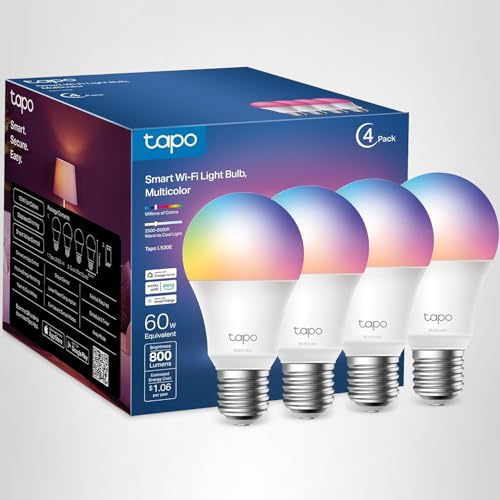
Yes. If you want bright, colorful bulbs that work with Alexa and Google, the Tapo TP-Link Smart Light Bulbs L530E are a smart buy. They are 800 lumens, CRI>90, and cover 16M colors with smooth dimming. They connect over 2.4GHz Wi‑Fi, so you don’t need a hub. That makes them great for renters, students, and first-time smart home users.
In my living room, one L530E handled evening reading with warm white at 40%. For game night, I set a bold magenta scene across two lamps. My partner loved the preset scenes, and I liked the steady response with voice commands. I also used a slow “wind down” schedule in my bedroom. The fade felt natural, and it helped me sleep faster.

My First Impression of Tapo TP-Link Smart Light Bulbs L530E
The four-pack arrived in a clean, compact box with clear setup steps. Each bulb felt solid, with a matte finish that looked neat in open fixtures. The A19 shape fits every lamp I tried. No rattles or cheap seams. It felt like a gear built to last.
The setup was simple. I screwed one in, opened the Tapo app, and joined my 2.4GHz network. The app found the bulb fast. A quick firmware update finished in a minute. Total time per bulb was about five to seven minutes. The first power-up showed rich colors and strong white brightness. Dimming down low stayed smooth, not jumpy. I felt that little burst of joy when the first “Alexa, turn on desk lamp” worked on the first try.

What Makes It Stand Out / Key Features
- 16M colors (RGBW) plus warm-to-cool white for day and night use
- 800 lumens brightness, 60W equivalent, CRI>90 for natural-looking colors
- Dimmable from the app or voice, no physical dimmer needed
- No hub required; 2.4GHz Wi‑Fi setup in minutes
- Works with Alexa and Google Home for hands-free control
- Schedules, timers, and sunrise/sunset automation
- Scenes and groups to manage many bulbs at once

What I Like
- Great value per bulb, especially in the 4-pack
- Strong brightness and smooth dimming down low
- High CRI makes skin tones and art look right
- Quick setup; no bridge or hub to manage
- Stable Wi‑Fi link and fast voice control
- Useful scenes and easy group control in the app
- Reliable schedules for wake-up and wind-down

What Could Be Better
- No Apple HomeKit support out of the box
- 2.4GHz Wi‑Fi only (no 5GHz)
- Do not use with wall dimmer switches
My Recommendation
If you want easy, colorful, and bright lighting on a budget, the Tapo TP-Link Smart Light Bulbs L530E is a safe pick. It is best for people who want simple voice control, fast setup, and solid scenes. It also suits renters and small homes that do not want a hub. If you need HomeKit or pro-grade effects, look at a higher-end system. For most homes, this one nails the basics and more at a kind price.
| Best for | Why |
|---|---|
| First-time smart home users | No hub needed, fast app setup, clear guides |
| Renters and small spaces | Easy to move, works with standard A19 lamps |
| Budget color lovers | Strong brightness and rich colors at a low price |

Alternative Products You Can Consider
Philips Hue White and Color Ambiance (Bluetooth) — Best for users who may add a Hue Bridge later. It works with Bluetooth out of the box and scales to a deep ecosystem. Color quality and effects are top-notch. It also supports HomeKit with the Bridge. It costs more than the Tapo bulbs but brings a mature platform.
Wyze Bulb Color — A budget-friendly color bulb with strong whites and bright output. It works with Alexa and Google and has a friendly app. Great for people already in the Wyze ecosystem. It is close in value to Tapo, though Tapo’s app felt a bit more polished for grouping in my tests.
Sengled Smart WiFi Color Bulb — A low-cost option with easy setup and good brightness. The app is simple and the bulb is responsive. Best for casual use in a few rooms. Compared to the Tapo bulb, Sengled’s automation tools feel lighter but still fine for basics.
| Product | Best For | Key Difference |
|---|---|---|
| Tapo TP-Link Smart Light Bulbs L530E | Budget-friendly color and voice control | No hub needed; strong value and easy app |
| Philips Hue White and Color Ambiance | Big, premium smart lighting setups | Works with Bridge for HomeKit and advanced scenes |
| Wyze Bulb Color | Wyze users and bargain hunters | Great whites and price; app leans Wyze-centric |
| Sengled Smart WiFi Color Bulb | Simple, low-cost home lighting | Solid basics; lighter automation features |
Final Verdict: Which Should You Buy?
For most people, the Tapo TP-Link Smart Light Bulbs L530E is the sweet spot. It is bright, colorful, and simple to run. No hub, fast setup, and stable voice control make daily life easy. The price per bulb is hard to beat.
Pick Philips Hue if you want the top ecosystem and plan to grow big with HomeKit support via the Bridge. Go Wyze if you already use Wyze cameras or sensors. Choose Sengled if you want low-cost basics for a few rooms. If you just want reliable color and control today, the Tapo bulb is the one I’d buy first.
FAQs Of tp link tapo smart bulb review
Do these bulbs need a hub?
No. The Tapo L530E bulbs connect over 2.4GHz Wi‑Fi. You only need the Tapo app and your router.
Will they work on 5GHz Wi‑Fi?
No. These bulbs use 2.4GHz only. Most routers support both bands, so you should be fine.
Can I use them with a wall dimmer switch?
Do not use with a dimmer. Leave the switch on and dim from the app or with voice.
How bright are they?
They are 800 lumens, a 60W equivalent. Good for bedrooms, offices, and most living rooms.
Do they support Apple HomeKit?
Not natively. They work with Alexa and Google Home. If you need HomeKit, consider Philips Hue with a Bridge.


![Apple Watch Series 11 [GPS 46mm] Review: Features & Benefits](https://techassemblage.com/wp-content/uploads/2026/05/Apple-Watch-Series-11-768x512.jpg)