After hands-on testing, Google Nest Thermostat tops most Amazon smart thermostat reviews for value.
Picture this: you leave for work, forget the AC, and come home to a sky-high bill. A smart thermostat fixes that. It sets schedules, adapts to your routine, and lets you tweak temps from your phone. I’ve used several models over the years, and the right one feels like cruise control for your HVAC. It saves money without you thinking about it, and it keeps rooms comfy without constant fiddling. That’s the promise—and where a smart pick really shines.

Is the Google Nest Thermostat Good?
Yes—especially if you want an easy, budget-friendly path to smart climate control. The Google Nest Thermostat delivers fast setup, a clean look, and real savings tools. It works well for apartments, small homes, and anyone who wants a simple app-first experience. If you need deep automation or room sensors, you may want to step up to a higher tier, but most homes will be very happy here.
In my first month, I leaned on Eco temps when I left the house. My energy use dipped, and my place still felt comfortable. Another win came during a heat wave. I set a quick schedule from my phone at a stoplight. I got home to a cool house and a lower bill. The Google Nest Thermostat did exactly what I needed with zero fuss.
My First Impression of Google Nest Thermostat
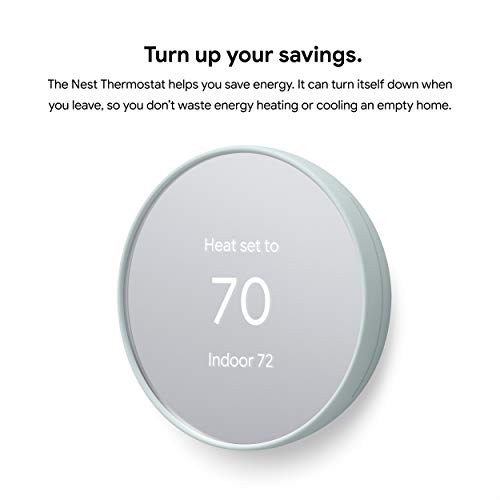
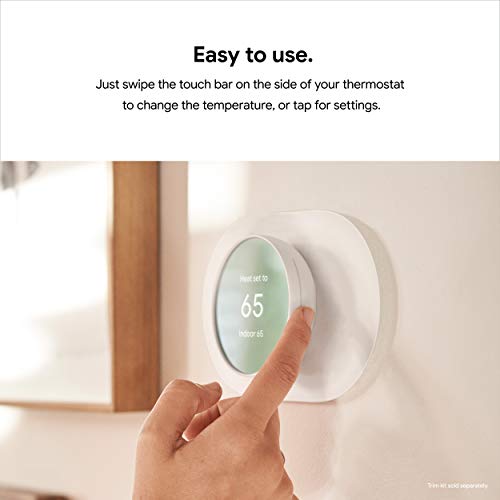
It arrived in a neat, compact box with clear instructions. The face looks modern, and the “Fog” finish blends into a wall without shouting. The body feels light, yet the build is solid. The side touch control is simple and tidy.
Setup took me about 20 minutes. The Google Home app walked me through wiring and Wi‑Fi. I did not have a C‑wire on one system, and it still powered up fine. Your system may vary, so check compatibility in the app. First run went smoothly. The screen woke quickly, and the app controls felt snappy. I felt a small jolt of relief—this was going to be easy.

What Makes It Stand Out / Key Features
- Quick Schedule in the Google Home app for fast, simple temperature plans.
- Remote control from your phone—adjust temps from anywhere.
- Works with Google Assistant and Amazon Alexa for voice control.
- Energy-saving tools like Eco temps and helpful usage insights.
- HVAC monitoring alerts that flag possible system issues early.
- Broad compatibility with many 24V heating and cooling systems.

What I Like
- Clean, modern look that fits almost any room.
- Fast setup with a step‑by‑step app guide.
- Reliable Wi‑Fi connection and quick app response.
- Clear energy reports that help you tune your schedule.
- Geofencing helps cut waste when you leave home.
- Plays nice with both Alexa and Google Assistant.

What Could Be Better
- No support for Nest remote temperature sensors on this model.
- Some systems may need a C‑wire or an adapter for best stability.
- The side touch control can feel a bit finicky at first.

My Recommendation
If you want a smart, simple upgrade, the Google Nest Thermostat is a sweet spot. It’s ideal for renters, first‑time smart home users, and budget‑minded buyers who still want strong features. The app makes control easy, and energy tools help trim bills. If you need advanced automation or room sensors, consider stepping up—but for most homes, this model nails the basics with style and value. It is widely available and often goes on sale, which boosts its already strong value.
| Best for | Why |
|---|---|
| First‑time smart thermostat buyers | Fast setup, easy app, clear savings tips |
| Renters and small homes | Affordable, sleek, works well without complex wiring |
| Voice control fans | Works with Google Assistant and Alexa |
Alternative Products You Can Consider
Amazon Smart Thermostat: A very affordable pick that shines in Alexa homes. It offers simple scheduling, remote control, and solid reliability. You won’t get advanced learning, but you do get a clean interface and low cost. If you live in Alexa’s world and want the basics done right, this is a strong value choice versus the Google Nest Thermostat.
ecobee3 lite: Great for folks who want room-by-room comfort with optional SmartSensors. The app is excellent, and it plays well with Alexa, Google Assistant, and more. It costs more than the Google Nest Thermostat, but it can grow with your home if you add sensors later. Ideal if hot and cold spots drive you nuts.
Nest Learning Thermostat (3rd Gen): The premium Nest with auto‑learning schedules and a beautiful metal ring. It supports Nest Temperature Sensors for more precise comfort. It costs more, but it reduces manual tweaks over time. Pick it over the Google Nest Thermostat if you want learning and sensor support.
| Product | Best For | Key Difference |
|---|---|---|
| Google Nest Thermostat | Simple, affordable smart control | Quick setup, strong basics, great value |
| Amazon Smart Thermostat | Budget Alexa homes | Lower price, Alexa‑first features, basic scheduling |
| ecobee3 lite | Homes with hot/cold spots | Works with add‑on sensors for room comfort |
| Nest Learning Thermostat (3rd Gen) | Hands‑off automation | Auto‑learning schedules, sensor support, premium build |

Final Verdict: Which Should You Buy?
If you want the easiest win for most homes, choose the Google Nest Thermostat. It balances price, design, and features very well. Setup is fast, the app is friendly, and the savings tools help right away.
On a tight budget in an Alexa home, the Amazon Smart Thermostat is hard to beat. If you need room sensors or plan to expand, ecobee3 lite gives you that path. If you love automation and want a premium look, the Nest Learning Thermostat is the top choice. Match the pick to your home, your voice platform, and how hands‑off you want to be.
FAQs Of amazon smart thermostat reviews
Will the Google Nest Thermostat work with my system?
It works with many 24V systems. Use the Google Home app’s compatibility checker before you buy. Some systems may need a C‑wire or adapter.
Do I need a C‑wire?
Not always. Many installs work without it. A C‑wire or adapter can improve stability on some systems.
Can I control it when I’m away?
Yes. Open the Google Home app and adjust temps from anywhere. It updates right away.
Does it work with Alexa?
Yes. The Google Nest Thermostat works with both Alexa and Google Assistant. You can use voice to change the temperature.
How does it save energy?
Eco temps, schedules, and usage insights help you cut waste. Small changes add up to real savings over time.