Govee Smart Light Bulbs shine for vivid color, painless setup, and voice control.
You walk into a dark room with your hands full. One voice command lights a cozy scene, your music pulses in color, and bedtime dims on a schedule. That is what the right smart bulbs do. They cut hassles, add mood, and make your home feel smarter in minutes. In this guide, I share what worked for me, what did not, and who should buy which bulb. It is my hands-on take after testing, so you can skip the guesswork and get lighting that fits your life.

Are Govee Smart Light Bulbs Good?
Yes. Govee Smart Light Bulbs are a strong pick if you want rich colors, fast setup, and no hub. They work with Alexa and Google Assistant, so voice control is easy. The WiFi and Bluetooth combo is steady. The 800 lumens output is bright for most rooms, and RGBWW means warm and cool whites plus 16 million colors. If you want advanced routines without buying a bridge, these deliver.
In my living room, I set a “Movie Night” scene with a warm amber and soft backlight. It felt like a small theater. On a busy weekday, I used the Music Sync during a quick workout. The colors tracked the beat and kept me moving. Govee Smart Light Bulbs simply made the space feel more alive.

My First Impression of Govee Smart Light Bulbs
The 4-pack arrived well-protected with clean, simple packaging. Each bulb felt solid, not flimsy. The matte finish looks premium, and the A19 shape fits standard lamps and fixtures. I scanned the QR code, followed the app prompts, and each bulb joined my WiFi in under a minute. No hub. No headache.
My first test was a warm white at 2700K. It looked cozy and even. Then I jumped to deep blues and neon pinks. Colors popped with no odd tint. Voice control through Alexa worked on the first try. My honest feeling? A small spark of joy. It felt like flipping from basic lighting to real home ambiance.

What Makes It Stand Out / Key Features
- RGBWW LED: 16 million colors plus warm-to-cool whites
- WiFi + Bluetooth: Reliable control with or without cloud
- Voice control: Works with Alexa and Google Assistant
- Music Sync: Colors react to sound for parties or workouts
- 800 lumens: Bright enough for most bedrooms and living rooms
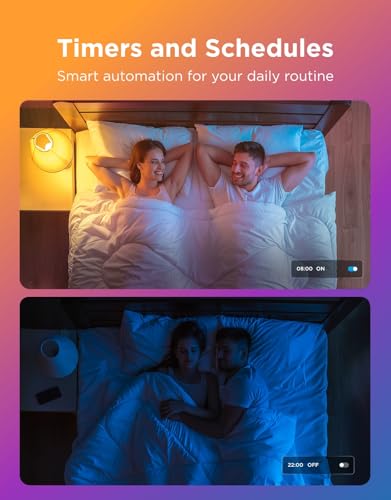
- App scenes and schedules: One-tap moods and daily routines
- No hub required: Simple A19 screw-in setup

What I Like
- Fast pairing and no bridge needed
- Rich, accurate colors with smooth dimming
- Strong automation with scenes and schedules
- Voice commands work on the first try
- Music Sync is fun and reactive
- Great value in a 4-pack for whole-room coverage

What Could Be Better
- 800 lumens may be dim for large, high-ceiling spaces
- Power loss can reset the last state in some fixtures
- Advanced home platform support is simpler than pro ecosystems

My Recommendation
If you want bold color, routine control, and voice support without a hub, Govee Smart Light Bulbs are a great pick. They are best for renters, first-time smart home users, and anyone who wants fast setup and solid features. The value of a 4-pack makes room makeovers easy. For pro-grade ecosystems, you may still prefer a hub brand, but for most homes, Govee Smart Light Bulbs hit the sweet spot.
| Best for | Why |
|---|---|
| First-time smart lighting | No hub, fast setup, clear app |
| Apartment and rental living | Easy to install and remove, voice ready |
| Entertainment and parties | Music Sync and vivid RGB effects |

Alternative Products You Can Consider
Philips Hue White and Color Ambiance (Bluetooth) A19 — Best for users who may expand to a larger, pro-grade system. Works with Bluetooth out of the box and grows with the Hue Bridge for advanced automations and rock-solid reliability. Colors are excellent, and the ecosystem is huge. It costs more, but it is the gold standard for many smart homes.
Kasa Smart KL125 Color Bulb — Great value for TP-Link Kasa users. Setup is simple, the app is friendly, and automations are reliable. Colors are good for the price, and it plays well with Alexa and Google Assistant. If you already use Kasa plugs or switches, this is a smooth fit.
Sengled Smart WiFi Color Bulb — Good for budget shoppers who still want scenes and voice control. Setup is quick, brightness is decent, and the app covers the basics. It is not as feature-rich as premium brands, but it nails the essentials for everyday use.
| Product | Best For | Key Difference |
|---|---|---|
| Govee Smart Light Bulbs | No-hub color lighting and Music Sync | WiFi+Bluetooth, strong value 4-pack |
| Philips Hue White and Color Ambiance | Advanced, expandable ecosystems | Optional Bridge unlocks pro-level features |
| Kasa Smart KL125 | Budget-friendly smart homes | Tight Kasa app integration and good automations |
| Sengled Smart WiFi Color Bulb | Simple, low-cost setups | Core features at a lower price |
Final Verdict: Which Should You Buy?
Pick Govee Smart Light Bulbs if you want bold color, easy app control, and voice support without buying a hub. They are bright enough for most rooms, and the Music Sync adds fun. The 4-pack stretches your budget and transforms a space fast.
Choose Philips Hue if you plan a whole-home system and want the option to add a hub for top-tier reliability and complex automations. Go with Kasa KL125 if you want simple, budget-friendly color bulbs that work well with a Kasa setup. Sengled is a solid low-cost choice for basic scenes and voice control. Match your choice to your home size, budget, and how deep you want to go with automations.
FAQs of the best smart bulbs reviews
Do I need a hub for Govee Smart Light Bulbs?
No. They connect over WiFi and Bluetooth, so you can skip a hub.
Are these bulbs bright enough for a living room?
Yes, for most rooms. At 800 lumens, one bulb is like a 60W equivalent. Use multiple bulbs for larger spaces.
Can I control the bulbs when I am away from home?
Yes. With WiFi and the app, you can control them remotely.
Do Govee Smart Light Bulbs work with dimmer switches?
Use standard on/off switches. Smart bulbs do not play well with old dimmer hardware.
Will Music Sync work without a speaker or mic?
The app uses your phone’s mic or device audio. It can react to the room sound or music playing.