Fast charging usually starts around 18 watts, with most phones supporting 25–65 watts for true rapid charging.
I’ve spent years testing chargers, phones, and cables, so I know what matters when you ask how many watts for fast charging. This article breaks down watt thresholds, charging protocols, practical charging times, and real-world tips. Read on to learn which wattage fits your device, how the tech works, and how to get the fastest, safest charge without guessing.

What is fast charging, and why wattage matters
Fast charging means delivering more power to a battery to cut charge time. Power equals volts times amps, and watts measure that power. Higher watts usually charge batteries faster. But speed depends on the device, battery size, and the charging protocol.
Knowing how many watts for fast charging helps you pick the right charger. A low-watt charger can be steady but slow. A well-matched high-watt charger can fill your battery quickly and safely.

Source: reddit.com
How many watts for fast charging: common thresholds
Here are common watt ranges and what they mean for devices.
- 5 to 10 watts
- Typical for old phones, wireless charging pads, and small accessories.
- Not considered fast for modern phones.
- 18 to 30 watts
- Entry-level fast charging for many recent phones and tablets.
- Often gives 0–50% in 30 minutes on many phones.
- 30 to 65 watts
- Mid-to-high fast charging is used by many flagship phones and some laptops.
- Often reaches 70–80% in 30 minutes.
- 65 to 120 watts
- Very fast for phones and ultrabooks. Used by some flagship phones for 0–100% in under an hour.
- 120+ watts
- Ultra-fast; more common in experimental or niche phone models. Heat and battery longevity become bigger concerns.
When asking how many watts for fast charging, remember: wattage alone doesn’t guarantee speed. Device tolerance, battery health, and the cable/protocol matter a lot.
Source: original-phoneaccessories.com
Charging protocols and how they affect wattage
Different protocols negotiate power between the charger and the device. The charger advertises capacity. The device accepts what it can handle.
- USB Power Delivery (USB-PD)
- A flexible standard used by many phones, tablets, and laptops.
- Supports a wide range of watts and fast switching of voltage.
- Qualcomm Quick Charge
- Common in many Android phones.
- Focuses on higher voltage and stepped charging to speed up top-ups.
- Manufacturer’s proprietary systems
- Brands like Oppo, OnePlus, Samsung, and others use custom tech.
- These can push higher wattage when paired with the maker’s charger.
- Wireless fast charging standards
- Uses coils and is limited by heat and coil efficiency.
- Wireless fast charging typically requires more power to match wired speeds.
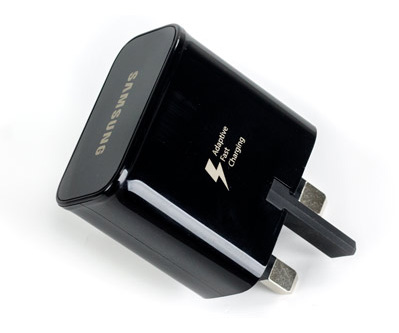
Understanding protocols helps answer how many watts for fast charging for your exact device. The phone and charger must speak the same language.
Source: co.uk
Real-world charging times and simple math
Wattage gives a rough idea of speed. Use battery capacity to estimate time.
- Example calculation
- A 4,000 mAh phone at 3.7V has about 14.8 Wh (watt-hours).
- A 30W charger theoretically supplies 30 Wh per hour. In perfect conditions, a 4,000 mAh phone would go from 0–100% in roughly 30 minutes.
- Real conditions reduce efficiency. You’ll often see 40–70 minutes for a full charge.
- Charging curves matter
- Fast charging fills the battery quickly up to about 50–80%. Then the speed slows to protect battery health.
- So, higher wattage shortens the initial surge more than the final top-up.
- Practical times
- 18–30W: 0–50% in 25–35 minutes for many phones.
- 30–65W: 0–70% in 20–30 minutes for some flagships.
- 65–120W: 0–100% in 30–50 minutes on specific models with optimized thermal control.
These numbers show why asking how many watts for fast charging is useful. Wattage translates into real time only when paired with device limits and charging curves.

Source: amazon.com
My experience: tips, mistakes, and practical advice
I’ve tested chargers from 18W to 100W across phones and laptops. Here’s what I learned.
- Use the right cable
- A lower-grade cable can bottleneck high wattage.
- Always match cable rating to charger and device.
- Watch heat
- Heat reduces charging efficiency and speeds battery wear.
- If a device gets very hot, it will throttle and slow charging.
- Firmware matters
- Phones with software optimizations manage wattage and battery temperature better.
- Keep device software up to date for the best charging performance.
- Avoid cheap chargers
- Certified chargers protect against overcurrent and voltage spikes.
- Cheap adapters may advertise high watts but deliver inconsistent power.
A practical tip: keep a 30–65W USB-C PD charger if you own a modern phone and a laptop. It covers most needs and reduces the number of chargers you carry.

Source: youtube.com
Benefits and limitations of high-watt fast charging
High-watt fast charging is convenient. It can make a short break into a meaningful top-up. But it has trade-offs.
- Benefits
- Faster top-ups when you’re in a hurry.
- Better for larger batteries when you need quick range or uptime.
- More flexible multi-device chargers can supply multiple ports.
- Limitations
- Increased heat during charging.
- Potential long-term battery wear if used constantly.
- The device must support the wattage and protocol.
- Wireless fast charging rarely matches wired speeds, even at high advertised watts.
Being aware of these limits answers practical parts of how many watts for fast charging you should use.
Source: sknrgyaesthetics.com
How to choose the right charger for your device
Match the charger to the device. Follow these easy steps.
- Check device specs
- Look for the max supported wattage and supported protocols.
- Choose a certified charger
- Pick USB-PD or the protocol listed by the manufacturer.
- Match cable rating
- Use quality USB-C cables rated for the needed amps and watts.
- Consider port count and power sharing
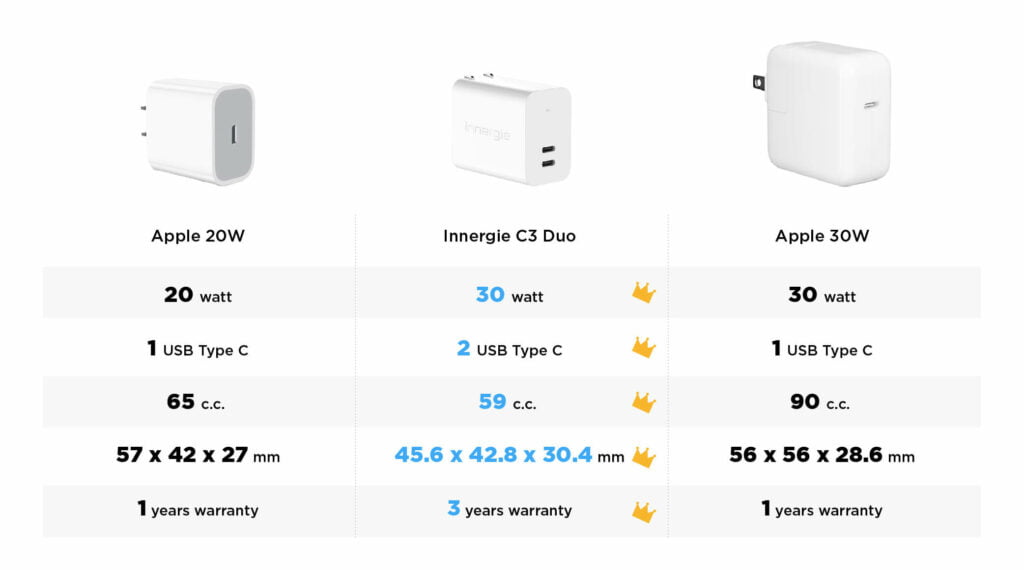
- Some chargers split wattage between ports. Check per-port output.
- Prioritize safety features
- Overcurrent, overvoltage, and temperature protection are important.
Following this helps you pick the correct wattage and avoid buying the wrong charger.

Source: amazon.com
Frequently Asked Questions of how many watts for fast charging
How many watts for fast charging is enough for most phones?
Most modern phones are happy with 18 to 30 watts for fast charging. Higher wattage, such as 45–65W, offers quicker top-ups but only if the phone supports it.
Will a 65W charger charge my phone faster if my phone supports 30W?
No. The phone negotiates its max input. A 65W charger will reduce output to the phone’s 30W limit, so speed will match the phone’s max.
Does higher wattage damage battery health?
Used constantly, higher wattage can increase heat and long-term wear. Occasional fast charges are fine, but avoid daily extreme fast charging if you want maximum long-term battery life.
Can I use a laptop charger to fast charge my phone?
Yes, if the charger and phone both support USB Power Delivery and the cable is rated properly. The charger will negotiate the correct wattage with the phone.
Is wireless fast charging as fast as wired at the same wattage?
No. Wireless charging has efficiency losses and heat limits, so it rarely matches wired speeds even at similar labeled wattages.
Conclusion
Knowing how many watts for fast charging helps you choose the right charger and get the speed you need without guessing. Match wattage to device specs, use good cables, and be mindful of heat to keep batteries healthy. Try a 30–65W USB-C PD charger if you want a single, flexible solution for most modern phones and small laptops.
Take action: check your device’s max wattage, pick a certified charger that matches it, and leave a comment about your favorite fast-charging setup or questions.